

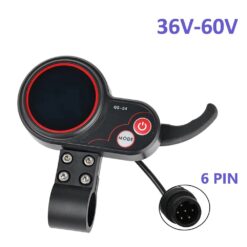
QS-S4 6-pin electric scooter display – 36–60 V




€39,00 inc. VAT
Only 1 left in stock
- Fast Delivery
- Free returns within 14 days
- Money back guarantee

QS-S4 6-pin electric scooter display – 36–60 V
QS-S4 6-pin electric scooter display with an integrated throttle, bright LCD, ODO/TRIP functions and 3 riding modes. Supports 36 V, 48 V, 52 V and 60 V systems. Compatible with Zero 8, Zero 9, Zero 10, Zero 10X and Kaabo models using the QS-S4 control system and matching 6-pin connection. Check your existing display, connector and system voltage before ordering.
Description
The QS-S4 6-pin electric scooter display combines a bright LCD, integrated throttle and control buttons in one housing. It supports 36–60 V systems and displays real-time speed, battery charge level and distance travelled. It can replace a worn or faulty display on scooters using the matching QS-S4 system and 6-pin connection. For “QS-S4 36–60 V display”, verify the original connector, wiring and controller compatibility before installation.
QS-S4 6-pin electric scooter display specifications
- Model: QS-S4
- Operating voltage: 36–60 V; supports 36 V, 48 V, 52 V and 60 V systems
- Connector: 6-pin, with 6 contacts
- Bright LCD with real-time speed and battery charge indication
- Integrated throttle
- ODO total-distance and TRIP journey-distance functions
- 3 riding modes
- MODE and power buttons
- Robust, durable housing
- Weight: approximately 170 g
Ride information and adjustable settings
The LCD is readable in daylight and lower-light conditions. ODO and TRIP let you check accumulated distance and individual journey distance alongside speed and battery charge.
Depending on the controller used, settings can include maximum speed, riding modes, automatic switch-off time and speed measurement units. Available adjustments therefore depend on the scooter’s controller, not just the dashboard.
Compatible models and connector checks
Suitable for the following scooters when equipped with the matching QS-S4 display system and 6-pin connector:
- Zero 8
- Zero 9
- Zero 10
- Zero 10X
- Kaabo models using the QS-S4 control system
- Other electric scooters using a QS-S4 display and 6-pin connection
Before ordering, check the connector, operating voltage and existing display model. QS-S4 displays are available with different connectors, including 5-pin and 6-pin versions, which are not interchangeable. Visually similar displays may be incompatible, so compare your existing unit with the product photographs.
Fitting and fault checks
The dashboard mounts on the handlebar and connects to the controller through its 6-pin connector. Disconnect the battery before carrying out replacement work.
If the display will not switch on, does not show speed or has an unresponsive throttle, the display itself is not necessarily faulty. A defective controller, damaged wiring or a power circuit fault can also cause these symptoms.
Additional information
| Weight | 0,14 kg |
|---|---|
| Category | Displays, Throttles |
| Suitable for: | Zero 10, Zero 10X, Zero 8, Zero 9 |
Reviews (0)
Be the first to review “QS-S4 6-pin electric scooter display – 36–60 V”
You must be logged in to post a review.
Related products


Worldwide delivery
14 days hassle free returns
Quality guarantee


Reviews
There are no reviews yet.